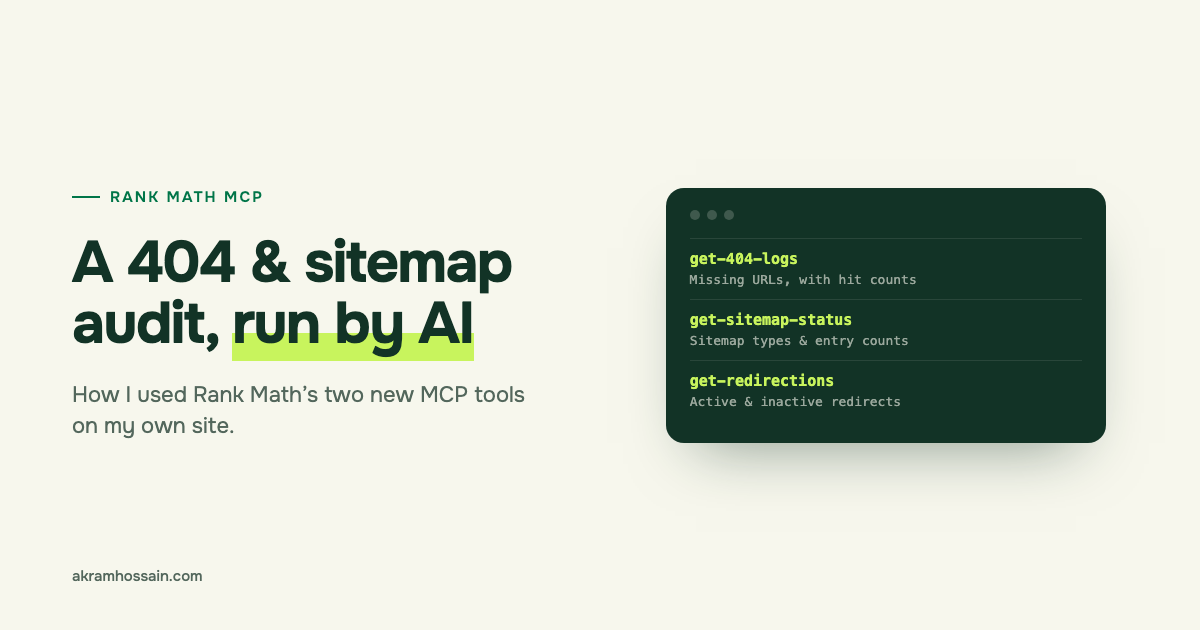
Short answer: Rank Math added two new MCP tools in September 2026. One reads your 404 log. The other checks your sitemap. I ran both on this site, and they led me to 33 dead affiliate links hiding in 10 live posts, two deleted posts my own Blogs page still linked to, and a brand-new post missing from my sitemap. Here’s exactly how I did it, so you can do the same on your site.
I run technical SEO audits for clients all the time. 404 errors and sitemaps are always on my checklist, but checking them by hand is slow and, honestly, a bit boring. So when Rank Math released these tools, I tested them on my own site first. Everything you’ll see below is real data from akramhossain.com.
What is Rank Math MCP, in plain English?
MCP stands for Model Context Protocol. Think of it as a plug that lets an AI assistant like Claude or ChatGPT talk to your WordPress site.
Without MCP, you open Rank Math, click through menus, copy the data and paste it into a chat. With MCP, you just ask: “Show me my 404 errors.” The AI asks Rank Math, gets the real data and explains it to you.
The best part? It works with the free version of Rank Math. You only need PRO or a Rank Math AI plan for features that already need them, like AI Visibility reports. (Not sure which plan does what? I broke it down in Rank Math AI explained.)
I’ve been using MCP connectors for a while. In my DataForSEO post, I used one to track how AI tools talk about brands. This time, I wanted to see how well it handles the boring-but-important technical stuff.
The two new tools: 404 logs and sitemap status
Rank Math version 1.0.279, released on 22 September 2026, added two tools built for technical SEO:
- Get 404 Logs (
rank-math/get-404-logs): reads your 404 Monitor log. For each missing URL, it shows how many times it was hit and when it was last hit. You can sort by hits or by date. - Get Sitemap Status (
rank-math/get-sitemap-status): tells you if your XML sitemap is on, where your sitemap index lives, and which sitemaps exist, with a rough URL count for each.
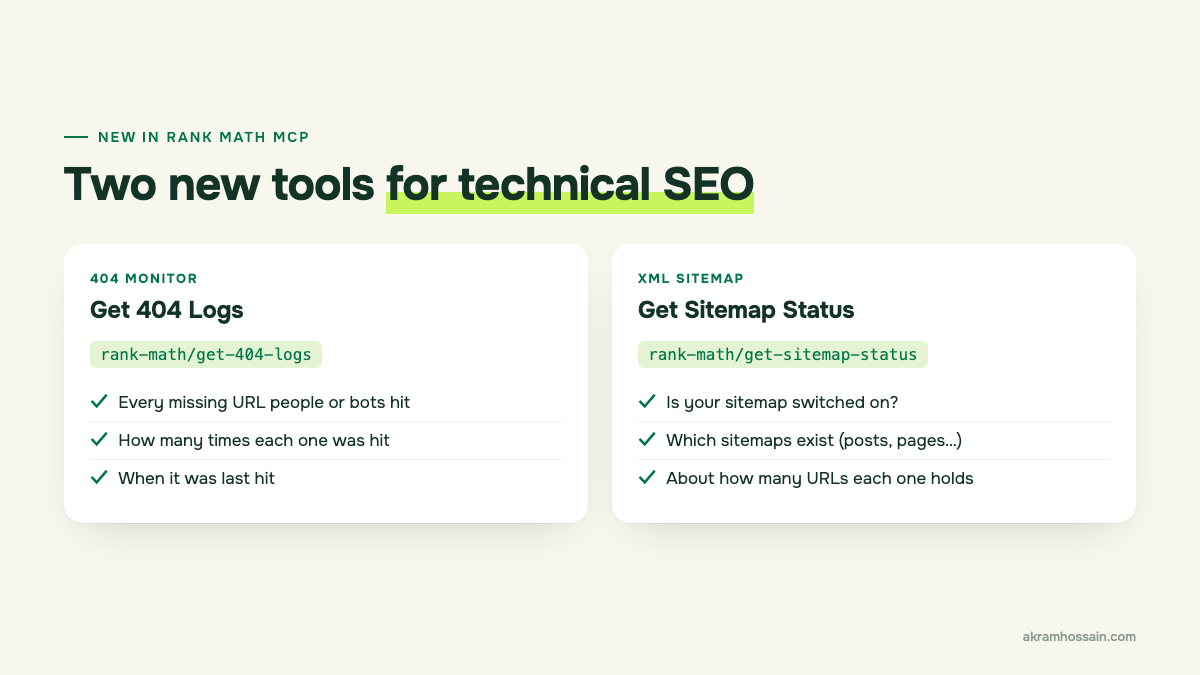
Both tools are read-only. They look, but they don’t change anything on your site. That’s exactly what I want from an audit tool.
I also used an older tool, Get Redirections (rank-math/get-redirections), which lists all your redirects, active and inactive. You’ll see why it mattered in a minute.
How to set it up
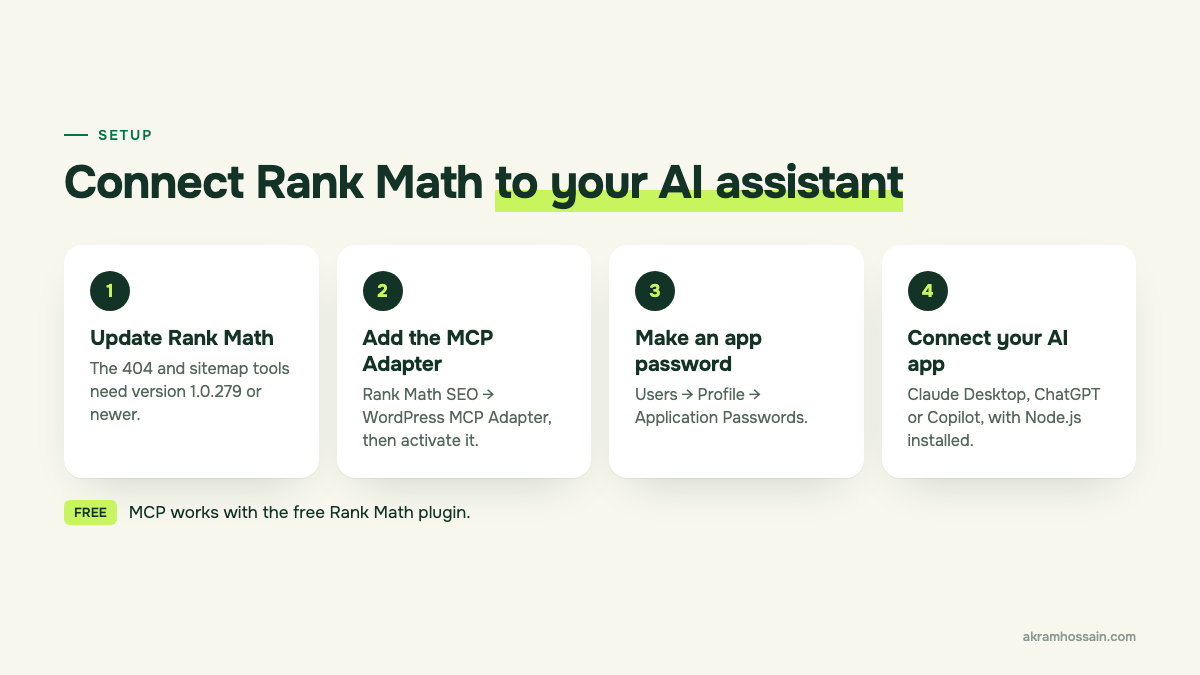
You need four things. Rank Math’s MCP setup guide walks through each one in detail, so here’s the short version:
- Update Rank Math. The 404 and sitemap tools need version 1.0.279 or newer.
- Install the WordPress MCP Adapter. Go to Rank Math SEO → WordPress MCP Adapter and activate it. Since version 1.0.281, Rank Math no longer bundles it, so don’t skip this step.
- Create an application password. Go to Users → Profile → Application Passwords. Name it something like “Claude MCP” and copy it somewhere safe. WordPress only shows it once.
- Connect your AI app. Install Node.js, then follow Rank Math’s guide for Claude Desktop, ChatGPT or GitHub Copilot.
One more thing: the 404 tool reads from Rank Math’s 404 Monitor module. If that module is off, there’s no log to read. Switch it on and give it a few days to collect data.
Safety tip: always use an application password, never your main login. You can revoke it from your profile any time.
Step 1: Pull your 404 log
My first prompt was simple:
Use Rank Math to get my 404 logs, sorted by hits. Group the URLs by type and tell me which ones actually matter.
When I checked on 12 November 2026, my log had 69 missing URLs with 107 hits in total. That sounds scary. It isn’t. Here’s how they broke down:
- 40 bot and scanner probes (71 hits). Things like
wp-content/plugins/gravityforms/readme.txtand old Joomla files. I don’t even use those plugins. These are bots checking if my site has a weak spot. - 14 old /go/ links (15 hits). Short links like
/go/asanaand/go/writerzen. More on these below, because they turned out to be the big one. - 8 old image files (8 hits). Images from 2022 and 2023 that were renamed or removed.
- 4 odd URLs (9 hits). Like
/404and/officialsite. Nothing on my site links to them. - 3 deleted posts (4 hits). Old posts I removed during a content clean-up.
So only 25 of the 69 URLs were worth a closer look. The rest was noise.
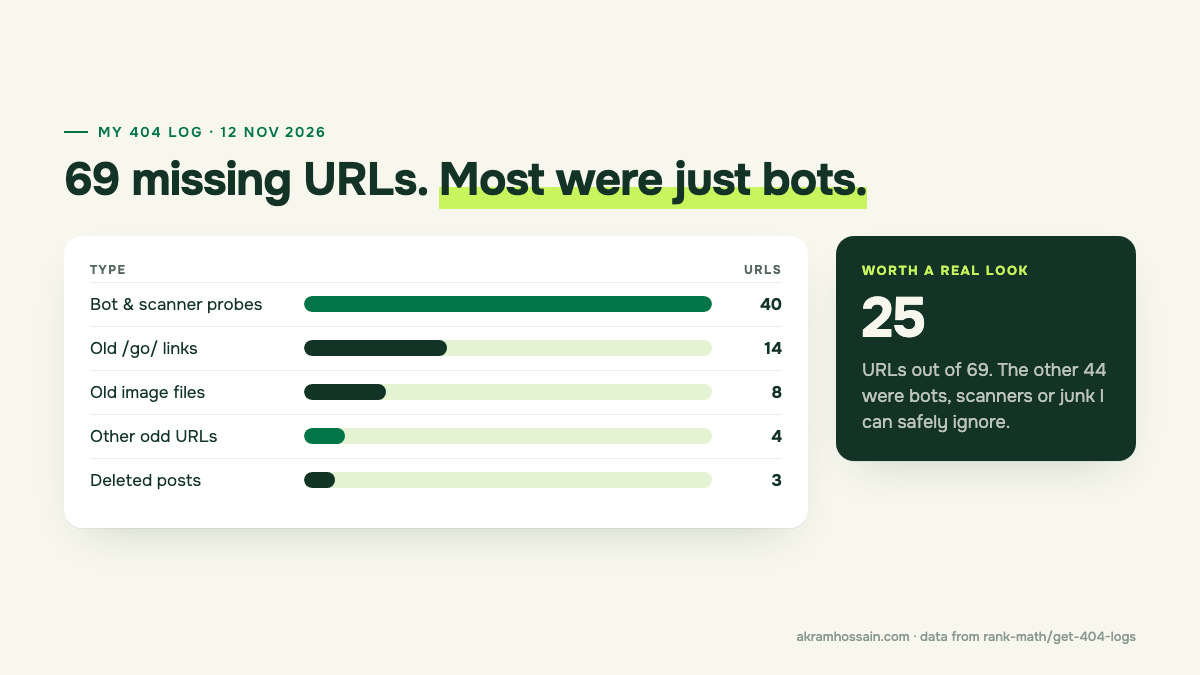
This is where AI really helps. A raw 404 log is a long, messy list. The AI sorted it into groups in seconds, so I could skip the junk and focus on what matters.
What the 404 log led me to: 33 dead affiliate links
The /go/ links caught my eye. These are short affiliate links I set up years ago. If visitors were landing on them as 404s, the links inside my posts were probably broken too.
So I searched my posts for every /go/ link and tested each one. The result surprised me: 33 out of 34 short links were dead, spread across 10 live posts. Only one still redirects.
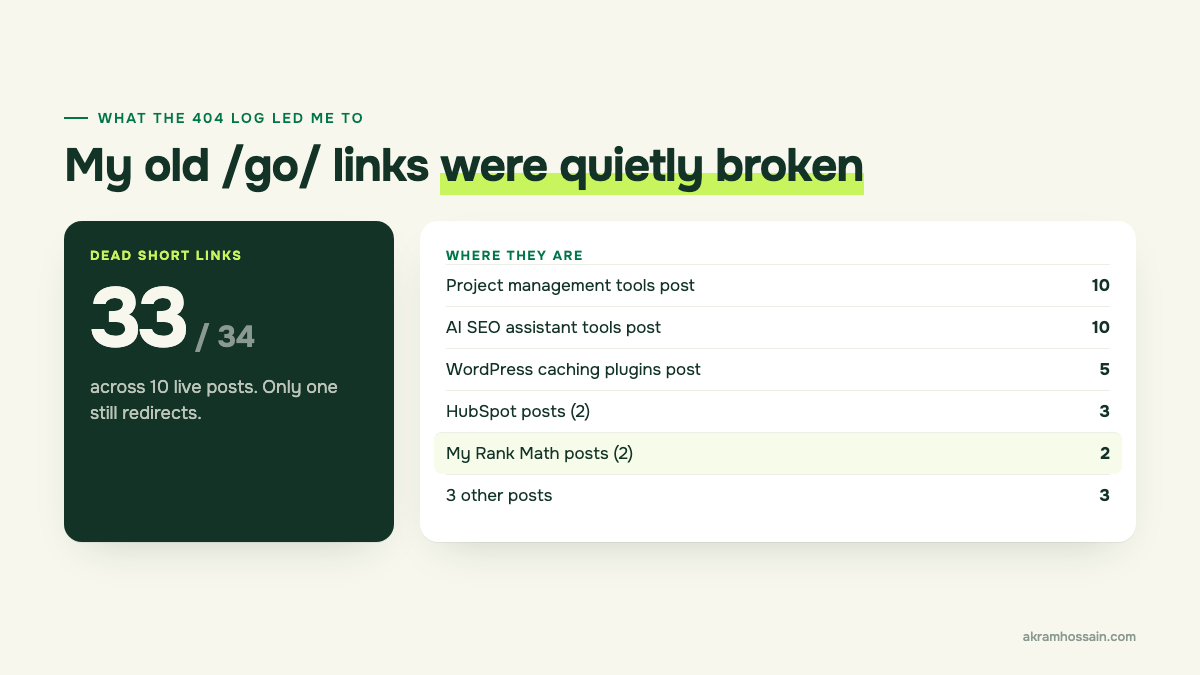
And yes, two of them were in my own Rank Math posts. My Rank Math affiliate links, in posts about Rank Math, going to a 404 page. Ouch.
Why did it happen? Rank Math’s settings still list a content type from an old affiliate link plugin. That plugin is gone, so the short links it created stopped working. Nothing warned me, so I never noticed.
Update: I’ve since fixed all 33. The Rank Math links now go straight to Rank Math, and the rest point to each tool’s official site. While fixing them, I found a second hidden problem: an affiliate blocks plugin was no longer installed, so 126 buttons, call-to-action boxes and comparison tables had quietly disappeared from 18 posts. Reinstalling the plugin brought them all back. One small check led to two big fixes.
Here’s the lesson: a 404 log doesn’t just show missing pages. It shows where your own links are broken. Every reader who clicked those links hit a dead end.
One limitation I hit: my 404 Monitor runs in Simple mode, so the log didn’t record which page each visitor came from. I had to search my posts to find the source. If you want that detail, switch the 404 Monitor to Advanced mode in Rank Math’s settings.
Bonus: deleted posts my own Blogs page still linked to
Next, I checked the three deleted posts against my redirects:
Get my redirections. Do any of my 404 URLs already have a redirect set up?
The Get Redirections tool showed I have 47 redirects in Rank Math: 30 are 301 redirects and 17 are 410 (gone) rules. And one of my deleted posts, about building a career with SEO, already had a redirect. It was just switched off.
Then I found something worse. My Blogs page still links to two of those deleted posts. So I was sending my own readers to a 404 page.
Both are quick fixes: remove the old links from the Blogs page, and either switch the redirect back on or point it to a better live post.
Step 2: Check your sitemap status
Next prompt:
Use Rank Math to check my sitemap status. Then compare it with my published posts and pages, and tell me what’s missing.
The tool said everything was fine: sitemap on, two sitemaps (posts and pages), around 57 URLs in each. But “fine” isn’t always “right”. So I compared it with what’s actually published. Three things stood out:
- My newest post was missing. I’d published my Rank Math AI post more than 30 minutes earlier, and it still wasn’t in the post sitemap. That’s usually caching. Clear your cache, and for Google, request indexing in Search Console. Rank Math’s Instant Indexing module can also notify Bing and other IndexNow search engines straight away.
- 9 pages aren’t in the sitemap, on purpose. My privacy, terms, cookie and other policy pages are set to noindex. That’s correct. But my Bio page is noindex too, and for an SEO consultant, a Bio page builds trust. I’m reviewing that one.
- No category sitemap. It’s switched off in my settings. That’s fine if category pages don’t bring you traffic, but it should be a choice you make on purpose, not by accident.
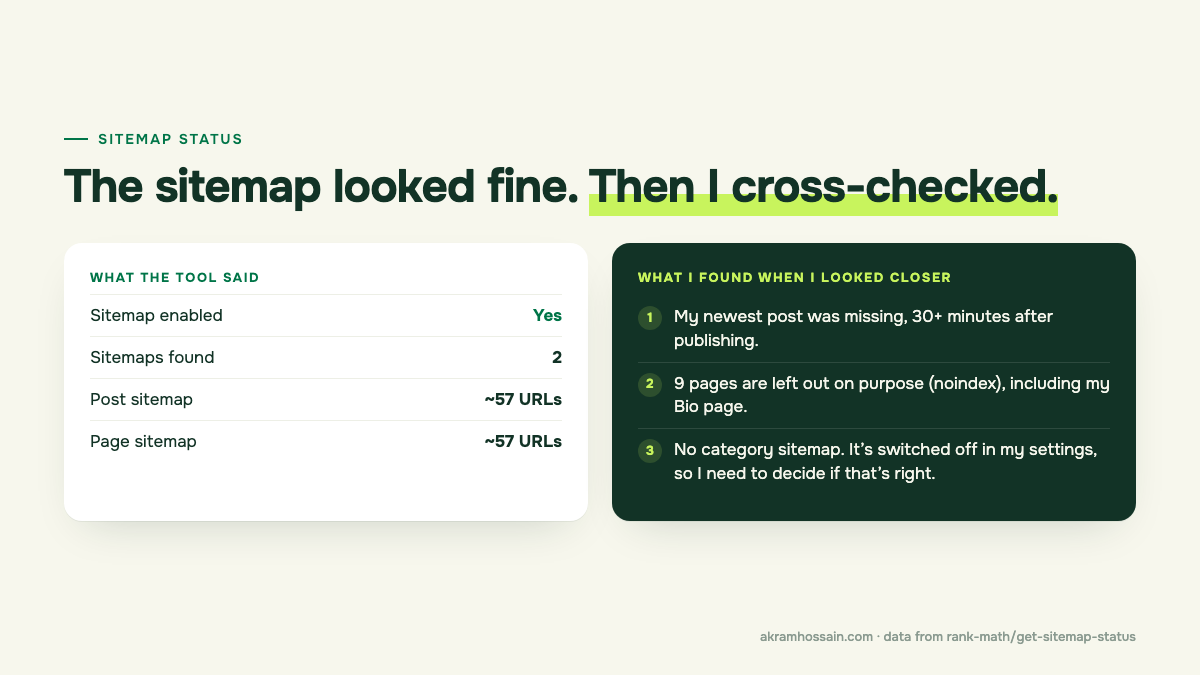
Keep in mind that the sitemap tool gives you counts, not full lists. Use the counts as a quick health check, then dig deeper when the numbers don’t match what you expect. For the Google side of things, I also check the Pages report in Search Console. I covered that in my Google Search Console features guide.
My fix plan for each type of 404
Not every 404 needs a redirect. Redirecting junk just creates more junk. Here’s how I decide what to do:
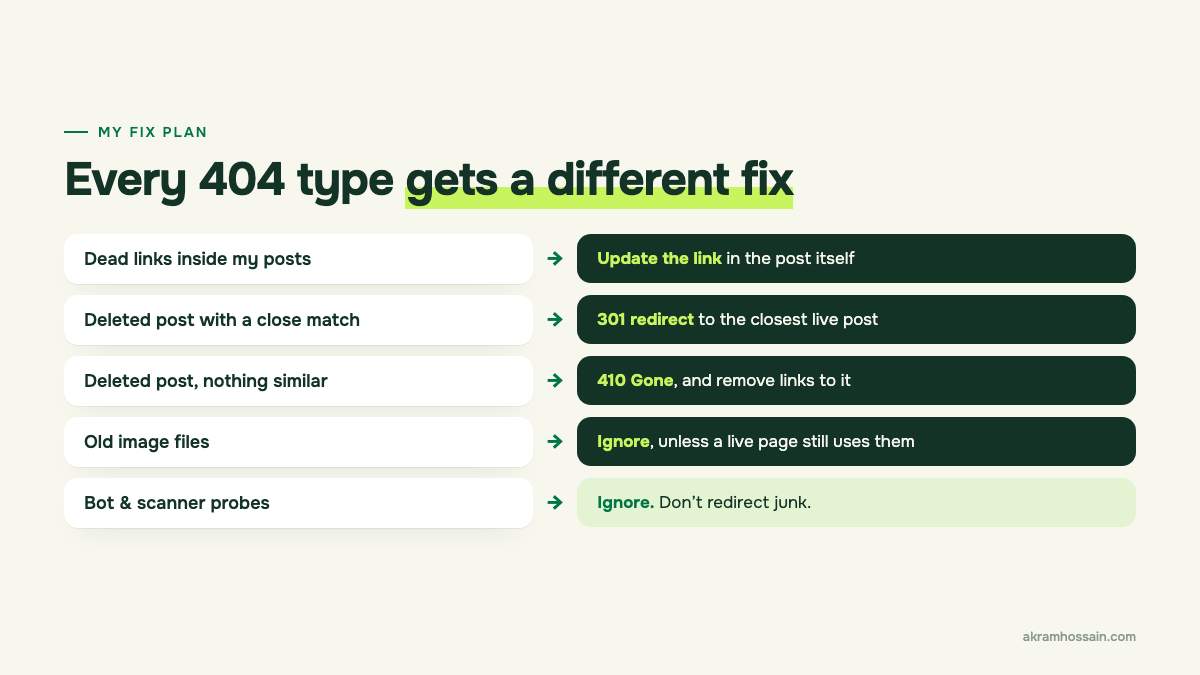
| 404 type | What I do | Why |
|---|---|---|
| Dead links inside my posts | Update the link in the post | Fixes it for readers right away |
| Deleted post with a close match | 301 redirect to the closest live post | Keeps the visitor and the link value |
| Deleted post, nothing similar | 410 Gone, and remove internal links to it | Tells Google it is gone for good |
| Old image files | Ignore, unless a live page still uses them | Nobody sees them |
| Bot and scanner probes | Ignore | They are not real visitors |
One thing Rank Math MCP can’t do yet is create redirects. It can read them, but you still add new ones yourself in Rank Math → Redirections. Honestly, I’m fine with that. Redirects are decisions I want to make myself.
Prompts you can copy
Here are the prompts I’d use for a monthly check:
- “Get my 404 logs sorted by hits. Group them into bots, old links, deleted pages and other.”
- “Which of my 404 URLs look like real pages people want, not bot traffic?”
- “Get my redirections. Which of my 404 URLs already have an inactive redirect?”
- “Check my sitemap status. Is anything switched off that should be on?”
- “Compare my sitemap counts with my published posts and pages. What’s missing?”
Tip: ask the AI to group and explain, not just list. That’s where the real time saving is.
Is it worth setting up?
For me, yes. The AI turned a messy 69-line log into 25 real issues, and it pointed me to 33 broken links I would never have spotted on my own.
It’s not magic, though. It can’t see which page sent a visitor to a 404 (unless you use Advanced mode), it can’t create redirects, and the sitemap tool gives counts, not full lists. You still need to think. But it takes away the boring part, and that’s what makes me actually do the check every month.
If you run a WordPress site with Rank Math, set this up and run the same check once a month. And if you’d rather have someone go through your whole site for you, that’s exactly what I do in my technical SEO service.